Sequence detection and scanning
How SeqLens finds image sequences and what status it assigns to each.
SeqLens treats images whose filenames follow the pattern “name + frame number + extension” as an image sequence. For example, shot_0001.exr through shot_0100.exr are grouped into one sequence. Detection rules, including the 2-frame minimum, digit handling, the guard that excludes groups with a frame range of 1,000,000 or more, and supported extensions, are summarized in Supported formats.
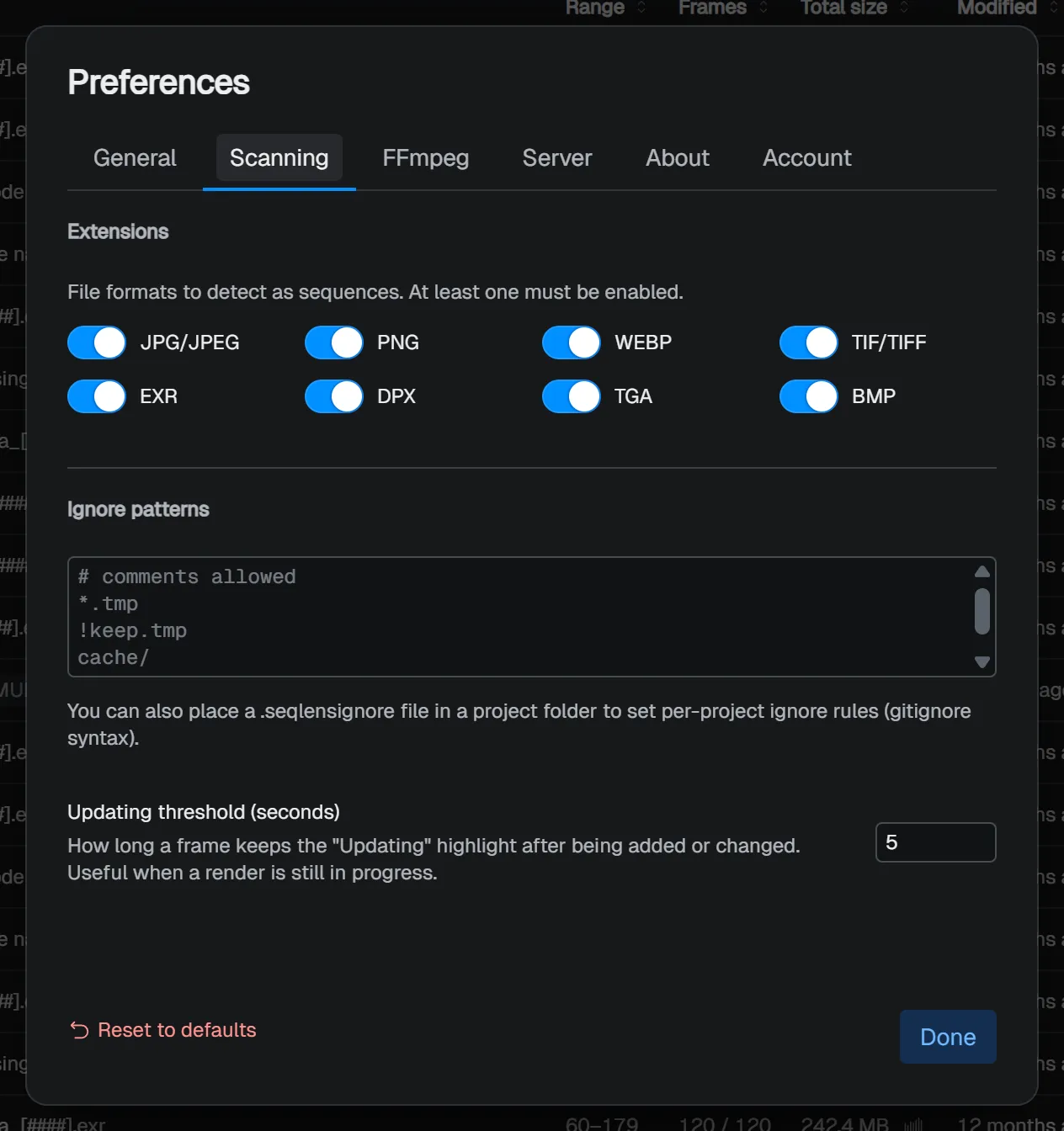
Choose the extensions to scan in Preferences → Scanning. Video files are not supported. If you want another format added, let us know through the support form.
Ignore patterns
Files and folders you want to exclude from scanning can be specified with syntax compatible with gitignore syntax. Rules that apply across the app are configured in Preferences → Scanning → Ignore patterns.
Examples
# Ignore temporary files and caches
_tmp/
**/cache/

# But keep important review folders
!**/cache/review/
To use per-project exclusion rules, place a .seqlensignore file in the project folder.
How scanning works
When you open a project, folder scanning starts. The first scan checks the folder in bulk, and later scans focus on locations that changed since the previous scan.
While a project is open, SeqLens detects file additions, updates, and deletions and updates the list. During operations that handle many files, such as copy or move, file watching is paused temporarily to avoid false detections. At that time, the rescan button turns to a warning color, and pointing at it shows a tooltip that file watching is paused. It resumes automatically when the operation finishes. To rescan manually, use Cmd/Ctrl+R, View → Rescan, or the rescan button.
NOTE
It is normal for the rescan button to turn to a warning color during copy or move operations. This temporary pause prevents large I/O from being mistaken for “delete + add”, and it is lifted automatically when the operation completes.
Status list
| Status | Meaning |
|---|---|
| Healthy | Frames are present as expected |
| Missing | A frame is missing in the middle of the sequence |
| Updating | Recently written frames are included |
| Anomalous | A frame matches an anomaly detection rule |
| Error | A file cannot be read |
Updating is a temporary status for frames that were recently added or updated. You can change the threshold from 1 to 3600 seconds in Preferences → Scanning → Updating threshold (seconds). The default is 5 seconds. This is useful when checking frames as they are written sequentially during rendering.
When multiple conditions match, the displayed order is Updating, Missing, Error, Anomalous, Healthy.
SMB volume hint (macOS)
On macOS, a hint appears when you open an SMB share. This hint appears every time you open a project on SMB until you choose Don’t show again. With the macOS default settings, changes on SMB can take 5 to 15 seconds to appear. Adding the setting shown in the hint may improve this. After changing the setting, eject the share from the Finder sidebar and reconnect.